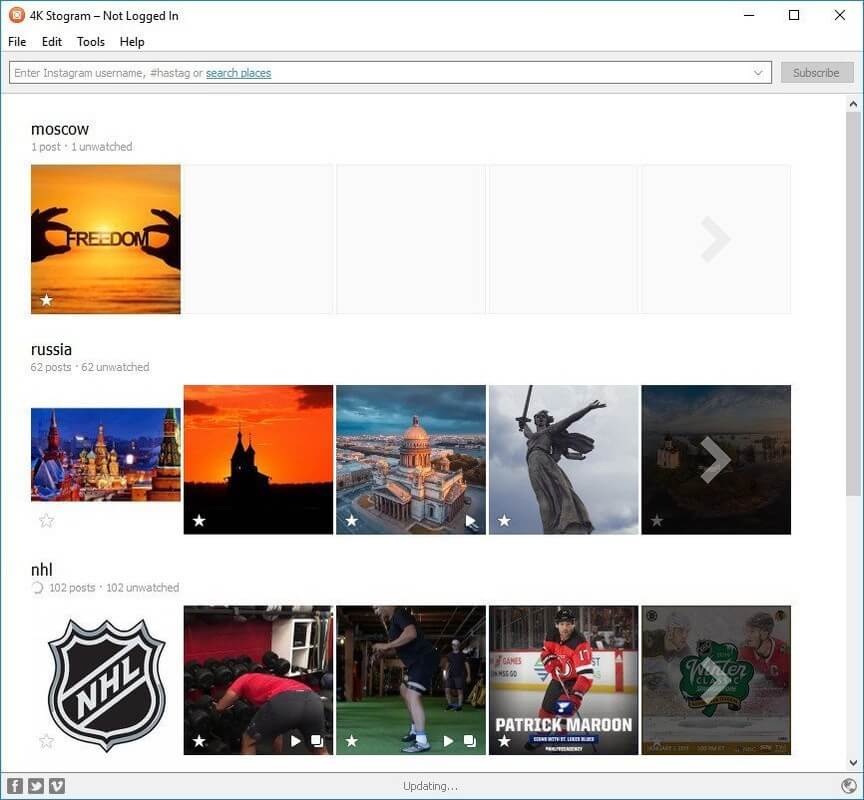
4K Stogram is a powerful macOS application designed to help users download and manage Instagram content with ease. It allows you to save photos, videos, reels, stories, and even entire Instagram profiles directly to your Mac. The software is widely used by content creators, marketers, and researchers who need offline access to Instagram media. With its clean interface and fast downloading engine, 4K Stogram makes Instagram archiving simple and efficient.
This tool supports bulk downloads, meaning you can follow multiple Instagram accounts and automatically save new posts to your device. It is especially useful for backup purposes or content inspiration collection. Whether you are saving personal memories or professional content, 4K Stogram ensures high-quality downloads in just a few clicks.
Key Features of 4K Stogram (Mac)
Download Instagram Photos & Videos :
- Save high-resolution images and videos directly from Instagram profiles, hashtags, or locations.
- Bulk Download Support :
- Download entire Instagram accounts, posts, or stories in one click.
- Automatic Updates :
- Follow accounts and automatically download new posts as they are published.
- Hashtag & Location Search :
- Easily discover and download content using hashtags or geotags.
- Backup Instagram Accounts :
- Create a full offline backup of Instagram profiles for safe storage.
- User-Friendly Interface :
- Simple and clean design makes it easy for beginners and professionals.
How to Download & Install 4K Stogram on Mac
- Visit the official 4K Stogram website.
- Download the macOS version of the software.
- Open the downloaded .dmg file.
- Drag and drop the app into the Applications folder
- Launch the app and sign in (optional for advanced features)
- Start searching Instagram profiles, hashtags, or locations.
- Click download to save content directly to your Mac.