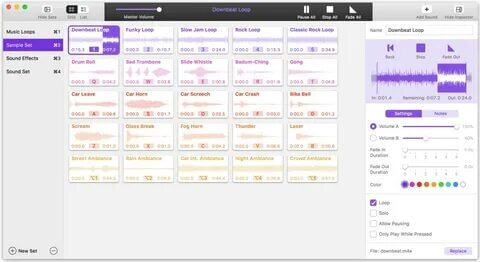
Farrago is a powerful and easy-to-use macOS application designed for managing and playing audio clips instantly. Developed for podcasters, streamers, voice actors, and content creators, it allows users to build custom soundboards with drag-and-drop simplicity. Whether you are triggering sound effects live or organizing audio snippets for projects, Farrago provides a smooth and responsive workflow that makes audio handling fast and efficient on Mac.
This software is especially useful for users who need instant audio playback without complicated editing tools. You can organize thousands of audio files into collections, assign keyboard shortcuts, and play multiple sounds at the same time. With its clean interface and Mac optimization, Farrago is ideal for live performances, studio work, and real-time audio control.
Key Features
- Instant Audio Playback:
- Play any sound instantly with a single click or keyboard shortcut. Perfect for live shows and streaming.
- Custom Soundboards:
- Create multiple sound boards to organize audio clips by category, project, or usage.
- Drag & Drop Support:
- Easily import audio files directly into the app without complex setup.
- Keyboard Shortcuts:
- Assign hotkeys to sounds for faster control during live sessions.
- Multi-Sound Playback:
- Play multiple audio clips simultaneously for layered sound effects.
- Clean Mac Interface:
- Designed specifically for macOS with a lightweight and user-friendly layout.
How to Download & Install Farrago (Mac)
- Visit the official developer website.
- Download the macOS version of Farrago.
- Open the downloaded .dmg file.
- Drag the Farrago app into the Applications folder.
- Launch the app and start adding your audio clips.
- Activate license (if required) for full features.