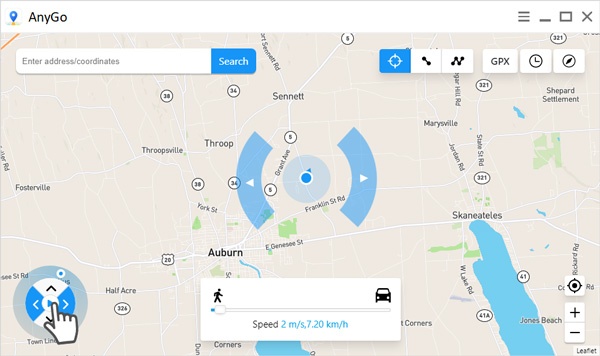
iToolab AnyGo is a powerful GPS location changer tool designed for iOS users who want to simulate movement and change their virtual location without jailbreaking their device. It is widely used for apps like games, social media, and location-based services where users want to access different regions or test location-based features. On macOS, AnyGo works as a desktop controller that connects with your iPhone or iPad and allows you to change GPS location instantly with just a few clicks.
This software provides a smooth and realistic location spoofing experience, including teleport mode, multi-spot movement, and joystick control. It is especially useful for developers, gamers, and users who want to protect their privacy or explore location-based apps. The interface is simple, making it suitable for both beginners and advanced users, while maintaining stable performance on Mac systems.
Key Features
- Instant GPS Location Change :
- Teleport your device location anywhere in the world with one click.
- Joystick Movement Control :
- Move freely in real-time using a virtual joystick for gaming and app testing.
- Multi-Spot Route Simulation :
- Create custom routes with multiple stops for realistic movement patterns.
- Compatibility with Location-Based Apps :
- Works with apps like Pokémon GO, Tinder, Snapchat, and more.
- No Jailbreak Required :
- Safe and secure usage without modifying your iPhone or iPad system.
- History & Favorites :
- Save frequently used locations for quick access anytime.
How to Download / Install on Mac
- Visit the official iToolab AnyGo website and download the Mac version.
- Open the downloaded DMG file on your Mac.
- Drag and drop AnyGo into the Applications folder.
- Launch the software and connect your iPhone/iPad via USB cable or Wi-Fi.
- Follow on-screen instructions to trust the connection and start using location spoofing features.