DRmare Audio Converter for Mac is a powerful audio conversion tool designed for macOS users who need a fast and reliable way to convert music and audio files into multiple formats. Whether you want to convert songs for playback on different devices or save audio in a more compatible format, this software provides a simple solution with excellent sound quality. Its intuitive interface makes it suitable for both beginners and advanced users.
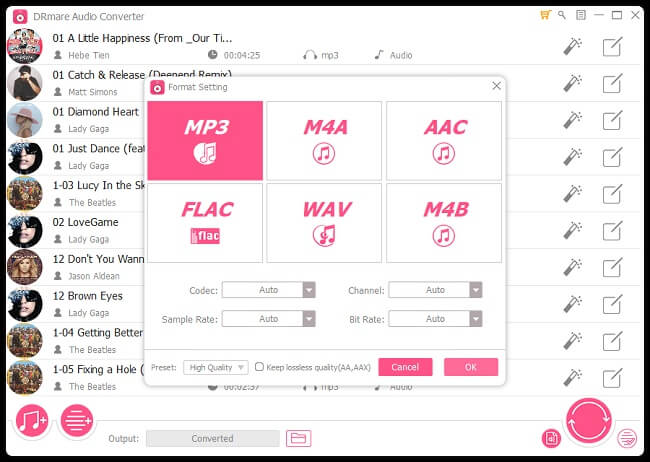
The software supports a wide range of popular audio formats, allowing users to convert files to MP3, AAC, FLAC, WAV, M4A, M4B, and many others. DRmare Audio Converter preserves the original audio quality while offering customizable settings such as bitrate, sample rate, and audio channels. Thanks to its optimized conversion engine, users can process audio files quickly without sacrificing performance.
Key Features
- Convert Audio to Multiple Formats:
- DRmare Audio Converter supports popular output formats including MP3, AAC, FLAC, WAV, M4A, M4B, and more, ensuring compatibility with various devices and media players.
- High-Speed Audio Conversion:
- The software uses advanced technology to convert audio files at high speed while maintaining excellent sound quality.
- Lossless Audio Quality:
- Preserve the original quality of your music and audio tracks during the conversion process for the best listening experience.
- Batch Conversion Support:
- Convert multiple audio files simultaneously, saving time and improving productivity.
- Custom Output Settings:
- Adjust bitrate, sample rate, codec, and channel settings according to your personal requirements.
- User-Friendly Interface:
- A clean and modern interface allows users to convert audio files with just a few clicks.DRmare Audio Converter 2.10.0 – DRM-remover for audio files
How to Download and Install DRmare Audio Converter on Mac
- Download the latest version of DRmare Audio Converter for Mac.
- Open the downloaded DMG installation file.
- Drag the application into the Applications folder.
- Launch the software from Launchpad or the Applications directory.
- Add your audio files and start converting them to your preferred format.
Why Choose DRmare Audio Converter?
DRmare Audio Converter for Mac is an excellent choice for users who frequently work with audio files and need a reliable conversion tool. Its combination of speed, quality preservation, format support, and easy-to-use interface makes it one of the most practical audio converters available for macOS. Whether you're organizing your music library or preparing audio files for different devices, DRmare Audio Converter provides a smooth and efficient experience.