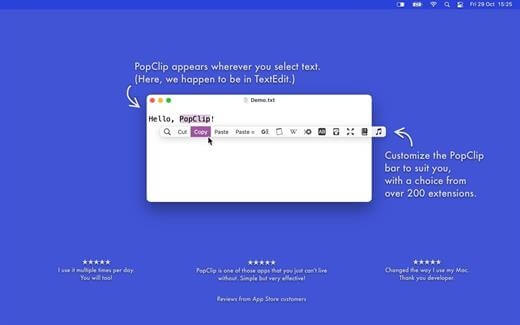
PopClip is a powerful macOS productivity tool designed to improve the way you interact with text. Once installed, PopClip automatically appears whenever you select text with your mouse, giving you instant access to useful actions like copy, paste, search, spell check, translation, and app-specific extensions. It is widely used by writers, developers, researchers, and everyday Mac users who want to speed up repetitive text tasks and make their workflow smoother and more efficient.
What makes PopClip especially useful is its flexibility and extension system. You can customize it with hundreds of extensions to add new actions such as sending text to notes apps, opening links, formatting code, or searching directly in browsers. Instead of switching between apps, PopClip keeps everything one click away, making it a lightweight but powerful productivity booster for macOS users.
Key Features (PopClip)
- Instant text actions:
- Appears automatically when you select text
- Custom extensions:
- Add tools like translation, grammar check, and note saving
- Copy & paste shortcuts:
- Faster text handling without keyboard shortcuts
- App integration:
- Works with Safari, Notes, Mail, Chrome, and more
- Developer-friendly:
- Supports custom scripts and workflows
- Lightweight performance:
- Runs quietly in the background without slowing Mac
How to Download & Install PopClip
- Visit the official PopClip website.
- Download the macOS installer file (.dmg)
- Open the downloaded file and drag PopClip into the Applications folder.
- Launch PopClip from Applications.
- Grant necessary permissions (Accessibility access) for full functionality.
- Start selecting text to see PopClip in action.