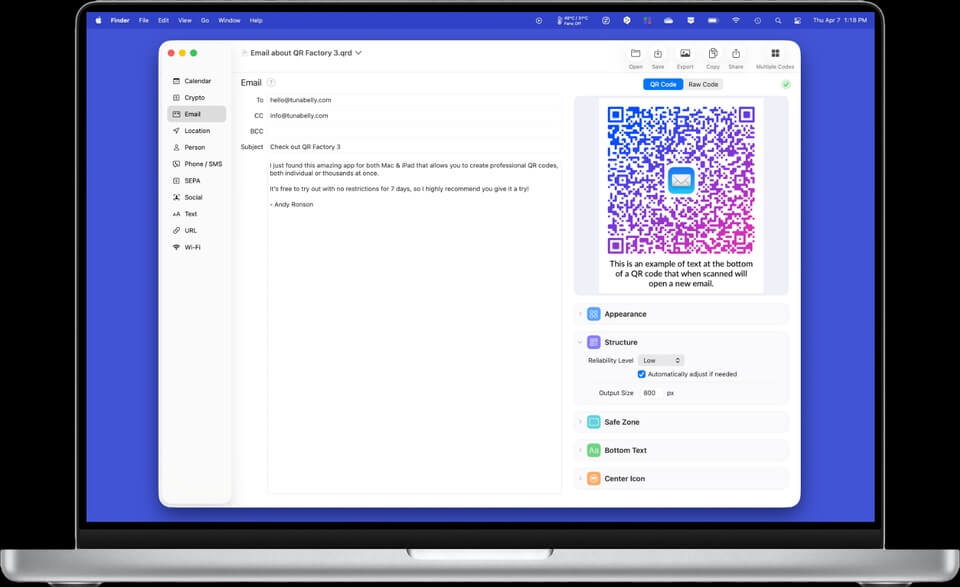
QR Factory is a powerful and user-friendly QR code generator designed specifically for macOS users. The software allows you to create high-quality QR codes for websites, emails, phone numbers, Wi-Fi networks, business cards, social media profiles, and much more. With its intuitive interface and advanced customization options, QR Factory makes QR code creation simple for both personal and professional use.
Whether you're a business owner, marketer, designer, or everyday user, QR Factory provides all the tools needed to generate attractive and fully functional QR codes. The application supports vector-based output formats, ensuring that your QR codes remain sharp and clear when printed on business cards, posters, brochures, or other marketing materials. Its lightweight design and smooth performance make it an excellent choice for Mac users looking for a reliable QR code creation tool.
Key Features
- Create Multiple QR Code Types:
- Generate QR codes for URLs, emails, phone numbers, SMS messages, contacts, Wi-Fi credentials, calendar events, and more.
- Advanced Customization Options:
- Customize colors, styles, borders, and error correction levels to create unique QR codes that match your branding.
- High-Quality Export Formats:
- Export QR codes in PNG, PDF, SVG, EPS, and other professional formats suitable for printing and digital use.
- Batch QR Code Generation:
- Create multiple QR codes quickly, saving valuable time for businesses and marketing professionals.
- Vector Graphic Support:
- Generate scalable vector QR codes that maintain perfect quality regardless of size.
- User-Friendly Interface:
- Enjoy a clean and intuitive macOS interface that makes QR code creation fast and straightforward.
- Fast Processing:
- Generate QR codes instantly without affecting system performance.
How to Download QR Factory for Mac
- Download the latest version of QR Factory for macOS.
- Open the downloaded DMG file.
- Drag the QR Factory application into the Applications folder.
- Launch the software from Applications.
- Start creating professional QR codes for your projects.