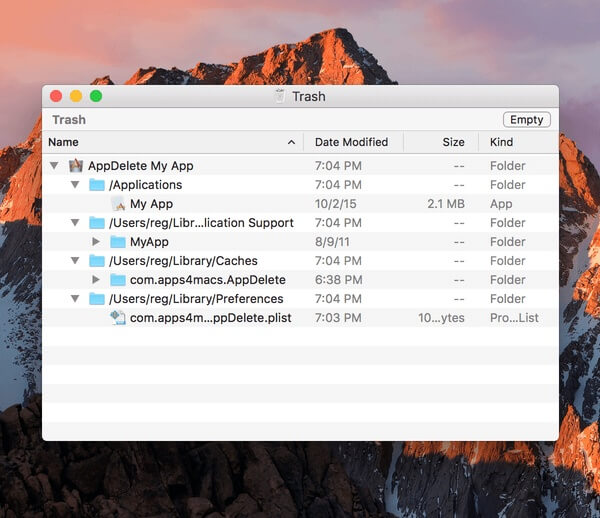
AppDelete 4.1.3 is a powerful macOS uninstaller designed to completely remove applications along with all associated files, preferences, caches, logs, and hidden support folders. Unlike dragging an app to the Trash, AppDelete performs a deep scan to locate leftover data scattered across your Mac, helping you recover valuable storage space and keep your system clean. Its intuitive interface makes it easy for both beginners and advanced users to uninstall software safely without leaving unnecessary files behind.
Whether you're upgrading applications, cleaning your Mac, or removing programs you no longer use, AppDelete 4.1.3 provides a reliable solution. The software supports drag-and-drop uninstalling, intelligent file detection, and secure deletion options for a hassle-free experience. It also allows users to review detected files before removal, ensuring complete control over what gets deleted while maintaining system stability.
Key Features
- Complete Application Removal:
- Deletes apps together with caches, preferences, logs, and support files.
- Smart Leftover File Detection:
- Automatically finds hidden files associated with installed applications.
- Drag-and-Drop Interface:
- Simply drag an application into AppDelete to begin the uninstall process.
- Widget & Plugin Cleanup:
- Removes browser plugins, widgets, preference panes, and screen savers.
- Safe Preview Mode:
- Review all files before permanently deleting them.
- Secure File Deletion:
- Permanently erase files to prevent recovery.
- Archive Before Deleting:
- Move applications to an archive for future restoration if needed.
- Batch Uninstall Support:
- Remove multiple applications in a single operation.
- Lightweight Performance:
- Uses minimal system resources while scanning.
- Optimized for Modern macOS:
- Fully compatible with recent macOS releases and Apple Silicon Macs.
How to Download ?
- Download the AppDelete 4.1.3 installer from a trusted source.
- Open the downloaded DMG file.
- Drag AppDelete into the Applications folder.
- Launch the application from Applications.
- Grant any requested macOS permissions.
- Start uninstalling applications and cleaning leftover files.