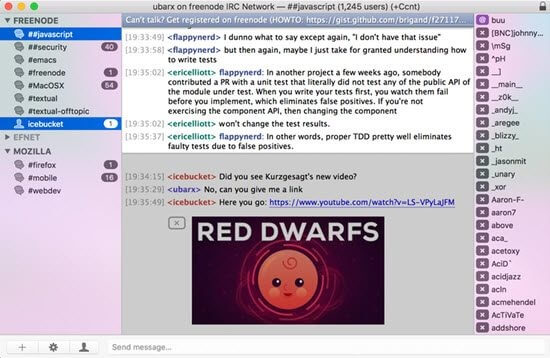
Textual is a professional and lightweight IRC (Internet Relay Chat) client designed specifically for macOS users who want a fast, reliable, and feature-rich chatting experience. It provides a clean interface with advanced customization options, allowing users to connect with IRC networks, join channels, and communicate with communities worldwide. Textual is popular among developers, online communities, and IRC enthusiasts because of its stability and smooth performance.
The application combines simplicity with powerful communication tools, offering support for secure connections, notifications, scripting options, and modern macOS design standards. With its optimized performance and low system resource usage, Textual delivers a seamless IRC experience while maintaining privacy and flexibility for both beginners and advanced users.
Key Features
- Modern macOS Interface:
- Designed with a clean and user-friendly interface that matches the macOS experience.
- IRC Network Support:
- Connect easily to multiple IRC networks and manage different chat servers from one application.
- Secure Connections:
- Supports SSL/TLS encryption to help protect private conversations and user data.
- Custom Themes & Appearance:
- Customize chat windows, colors, fonts, and layouts according to personal preferences.
- Powerful Notifications:
- Receive alerts for messages, mentions, and important channel activities even when the app is running in the background.
- Built-in Scripting Support:
- Advanced users can automate tasks and extend functionality using scripts.
- Lightweight Performance:
- Runs smoothly on macOS while using minimal system resources.
- File Transfer Support:
- Allows users to share files through supported IRC features.
- Multiple Server Management:
- Manage multiple IRC connections and channels easily from a single interface.
How to Download Textual IRC Client for macOS?
- Visit the official Textual website or trusted macOS software source.
- Download the latest version of the Textual installer file.
- Open the downloaded DMG file.
- Drag the Textual application into the Applications folder.
- Launch Textual and configure your IRC network settings.
- Start joining IRC channels and chatting with online communities.