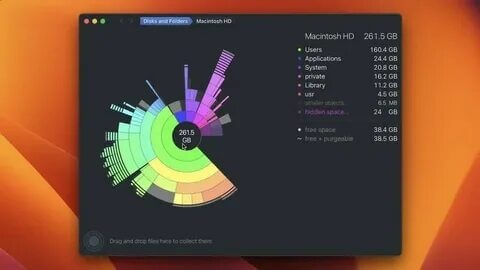
DaisyDisk is a popular disk space analyzer tool designed for macOS users who want to quickly find large files and free up storage space on their Mac. It scans your hard drive and displays disk usage through an interactive visual map, making it easy to identify unnecessary files, old data, and folders consuming too much space.
With its clean and user-friendly interface, DaisyDisk allows users to manage storage efficiently without dealing with complicated settings. The application provides detailed information about files and folders, helping you safely remove unwanted data and keep your Mac running smoothly.
Key Features
- Visual Disk Space Analysis:
- DaisyDisk uses an interactive graphical map to show how your storage is being used, making it simple to locate large files and folders.
- Fast Scanning Technology:
- The software quickly scans internal drives, external disks, and connected storage devices to provide accurate disk usage reports.
- Easy File Management:
- Users can preview files, move unwanted items to the collection area, and permanently delete unnecessary data.
- Safe Cleaning Process:
- DaisyDisk helps prevent accidental deletion by allowing users to review selected files before removing them.
- Support for Multiple Drives:
- Analyze Mac storage, external hard drives, USB drives, and other compatible storage devices.
- Modern macOS Interface:
- Designed specifically for Mac with a simple layout, smooth performance, and native macOS experience.
- Privacy Focused:
- DaisyDisk performs scans locally on your device and does not upload your personal files.
How to Download DaisyDisk for Mac?
- Visit the official DaisyDisk website or trusted Mac software source.
- Download the latest version compatible with your macOS system.
- Open the downloaded DMG file.
- Drag DaisyDisk into the Applications folder.
- Launch the application and start scanning your disk space.