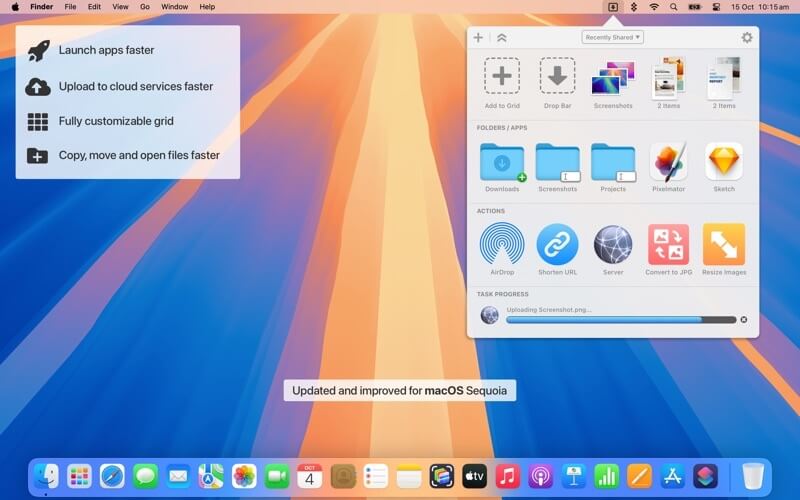
Dropzone for Mac is a powerful productivity and file management tool designed to make drag-and-drop actions faster, smarter, and more efficient. It helps users move files, upload content, install apps, and automate repetitive tasks directly from the Mac desktop. With its clean interface and smooth integration with macOS, Dropzone is widely used by professionals, creators, and everyday users who want to save time while handling files.
This software enhances workflow by adding a customizable grid at the top of the screen where users can drop files and instantly trigger actions such as uploading to cloud services, copying to folders, or running scripts. Dropzone significantly reduces manual effort and improves productivity by streamlining everyday file operations.
Key Features
- Drag & Drop Automation:
- Quickly move, copy, or upload files with simple drag-and-drop actions.
- Cloud Integration:
- Supports popular cloud services for fast file uploading and sharing.
- Custom Actions:
- Users can create their own workflows and shortcuts for repetitive tasks.
- App Installation:
- Easily install applications by dropping files into Dropzone.
- Fast File Transfer:
- Move large files between folders or drives without opening multiple windows.
- Lightweight Interface:
- Runs smoothly in the macOS menu bar without slowing down the system.
- Developer Friendly:
- Supports scripting and advanced automation for power users.
How to Download & Install Dropzone on Mac:
- Visit the official website of Dropzone or trusted Mac software distributor.
- Click on the download button for macOS version.
- Open the downloaded .dmg file.
- Drag the Dropzone app into the Applications folder.
- Launch the app and set up your preferred actions and shortcuts.
- Allow necessary permissions for full functionality.