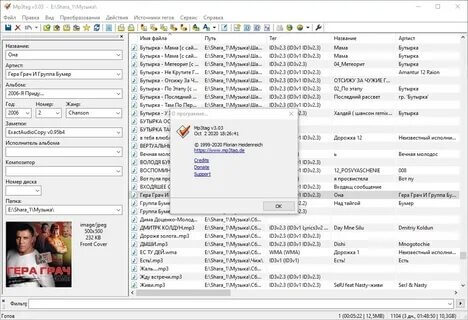
MP3tag is a powerful music tag editing tool that helps Mac users organize, edit, and manage their digital music collections. With MP3tag, users can quickly modify song information such as title, artist, album name, cover artwork, genre, track number, and other metadata fields. The software supports multiple audio formats, making it a useful solution for anyone who wants a clean and well-organized music library.
MP3tag provides an easy-to-use interface with advanced tagging features, batch editing options, and automatic tag importing capabilities. Whether you are managing a small personal collection or thousands of audio files, this application saves time by allowing you to edit multiple tracks at once. It is especially popular among DJs, music collectors, and users who want accurate music information across their devices.
Key Features:
- Advanced Tag Editing:
- Edit song details including artist, album, title, year, genre, and comments.
- Batch Tag Processing:
- Update metadata for multiple music files at the same time.
- Cover Artwork Support:
- Add, remove, or change album covers easily.
- Multiple Audio Format Support:
- Works with popular formats like MP3, AAC, FLAC, OGG, WAV, and more.
- Automatic Metadata Import:
- Fetch correct song information from online databases.
- File Renaming Tools:
- Rename music files automatically based on their tags.
- Custom Tag Fields:
- Create and manage additional metadata fields for better organization.
- User-Friendly Interface:
- Simple design suitable for both beginners and advanced users.
How to Download MP3tag for Mac?
- Download the latest version of MP3tag compatible with macOS.
- Open the downloaded setup file and install the application.
- Launch MP3tag from the Applications folder.
- Add your music files and start editing metadata information.
- Save changes to organize your music collection.