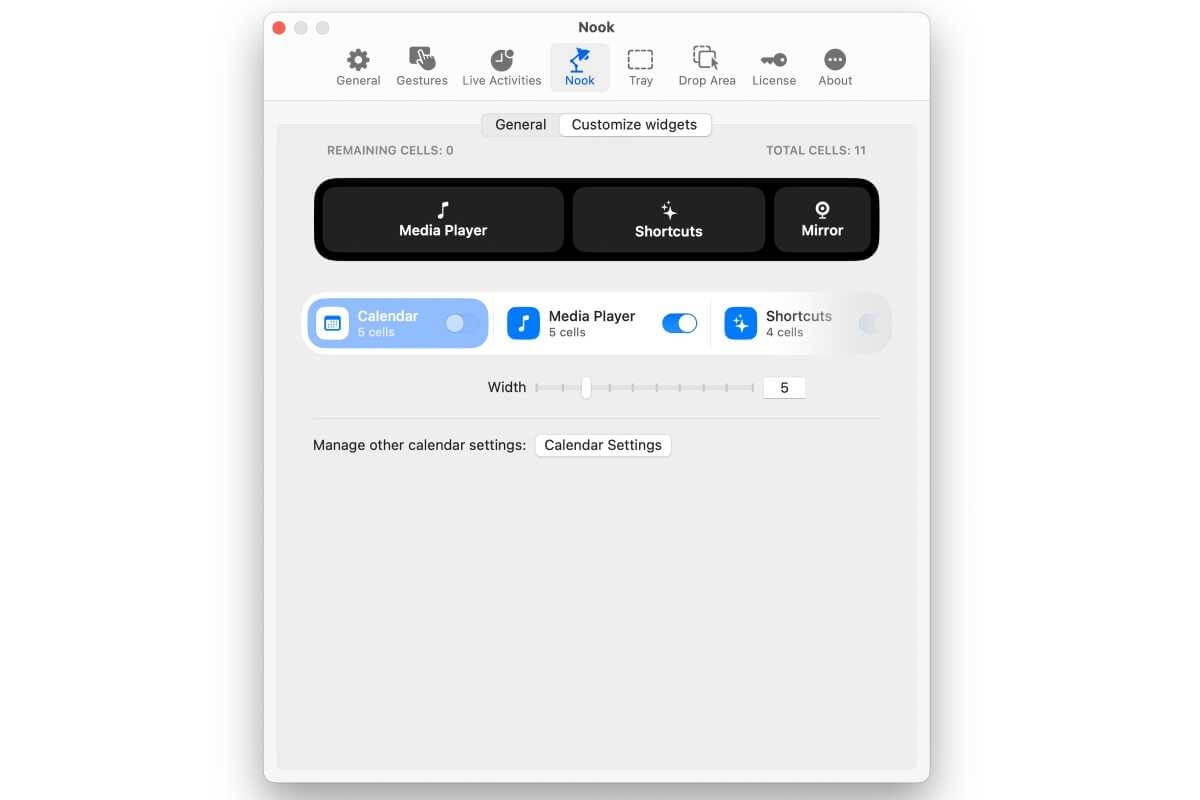
NotchNook for Mac is a powerful desktop productivity utility designed to transform the MacBook notch into a functional workspace. Inspired by modern dynamic interface concepts, the application lets you quickly access files, controls, notes, media playback, and useful widgets directly from the notch area. Instead of leaving the notch unused, NotchNook turns it into an intelligent productivity hub that blends naturally with macOS.
Whether you're a student, content creator, developer, or office professional, NotchNook helps streamline your daily workflow by keeping essential tools only a click away. The software offers a smooth, lightweight experience with extensive customization options, allowing you to personalize widgets, shortcuts, and appearance to match your productivity needs. Its clean interface and excellent macOS integration make it an excellent utility for modern Mac users.
Key Features
- Interactive Notch Workspace:
- Transform your MacBook notch into a fully functional productivity center.
- Quick File Drop:
- Drag and drop files into the notch for faster temporary storage and easy access.
- Media Controls:
- Control music and video playback without opening separate applications.
- Custom Widgets:
- Add widgets for weather, calendar, notes, timers, battery status, and more.
- Clipboard Manager:
- Access recently copied items instantly from the notch interface.
- Custom Shortcuts:
- Launch favorite apps, folders, and workflows with a single click.
- Minimal Resource Usage:
- Optimized to consume very little CPU and memory.
- Beautiful macOS Design:
- Matches Apple's design language with smooth animations.
- Multiple Personalization Options:
- Customize colors, layouts, widget placement, and behavior.
- Regular Updates:
- Frequent improvements, bug fixes, and compatibility enhancements.
How to Download
- Download the latest version of NotchNook for Mac from the download page.
- Open the downloaded DMG file.
- Drag NotchNook into the Applications folder.
- Launch the application from Applications or Launchpad.
- If prompted, allow the necessary macOS permissions in System Settings.
- Configure your preferred widgets and shortcuts to start using the notch workspace.