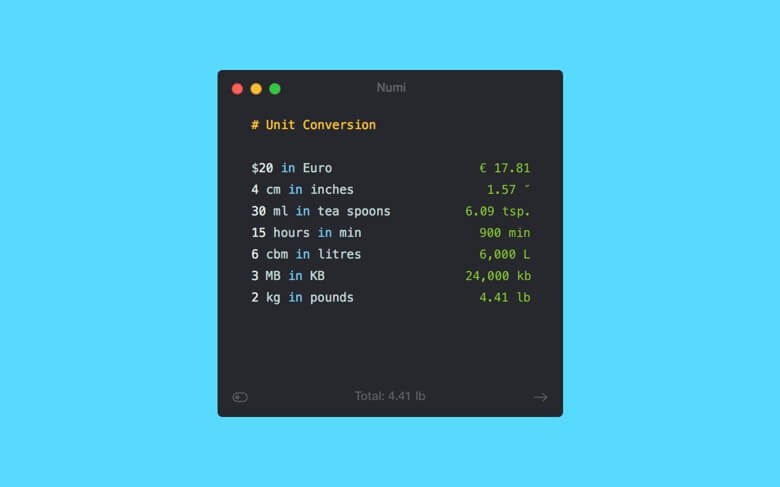
Numi is an advanced calculator application designed for macOS users who want a faster and smarter way to solve mathematical problems. Unlike traditional calculators, Numi allows you to write calculations in a natural text format, making it easier to handle complex equations, currency conversions, time calculations, and unit conversions. Its clean interface and powerful features make it a useful tool for students, developers, designers, and professionals.
Numi for Mac combines simplicity with advanced calculation abilities. Users can type expressions like normal sentences and get instant results without needing complicated formulas. The app supports multiple calculations at the same time and provides an organized workspace for managing daily calculations, making it a reliable productivity tool for macOS users.
Key Features of Numi for Mac
- Natural Language Calculations:
- Perform calculations by simply typing expressions in a human-friendly format instead of using traditional calculator buttons.
- Multiple Calculation Support:
- Work with several calculations together and easily compare different results in one workspace.
- Currency Conversion:
- Convert currencies quickly with updated exchange rates for international calculations.
- Unit Conversion:
- Convert measurements such as length, weight, temperature, speed, and more without using separate tools.
- Time and Date Calculations:
- Easily calculate differences between dates, add or subtract time, and manage schedules.
- Clean macOS Interface:
- Designed with a simple and modern interface that matches the macOS environment.
- Keyboard-Friendly Workflow:
- Quickly open and use Numi with keyboard shortcuts for faster productivity.
How to Download Numi for Mac?
- Download the latest version of Numi compatible with macOS.
- Open the downloaded installation file.
- Drag the Numi app into the Applications folder.
- Launch Numi from Applications.
- Start creating calculations using natural language commands.