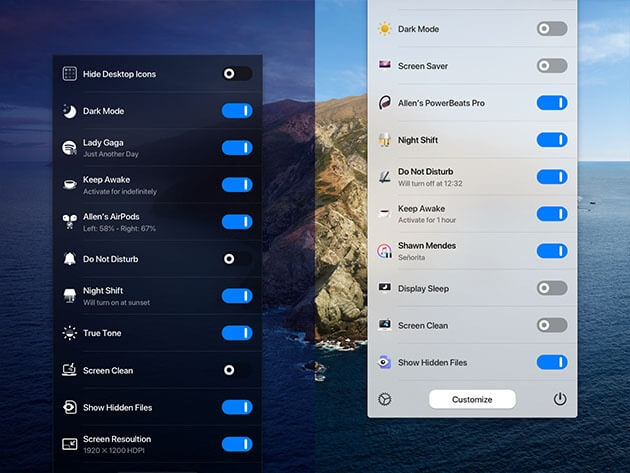
One Switch is a powerful macOS utility designed to make everyday tasks faster and easier by providing quick access to essential system features from a single menu. Developed for Mac users, this lightweight application allows you to control various macOS settings such as hiding desktop icons, enabling Dark Mode, activating screen savers, managing AirPods connections, and more without navigating through multiple system preferences.
With its clean interface and smart automation features, One Switch improves productivity by placing frequently used Mac controls at your fingertips. The app runs smoothly in the menu bar and is ideal for users who want a simple way to customize and manage their macOS workflow.
Key Features
- One-Click System Controls:
- Quickly access and manage important macOS functions directly from the menu bar.
- Hide Desktop Icons Instantly:
- Remove desktop clutter with a single click when you need a clean workspace.
- Dark Mode & Light Mode Switching:
- Easily change macOS appearance settings without opening System Settings.
- AirPods Connection Management:
- Quickly connect and manage your AirPods devices for a smoother audio experience.
- Screen Saver Controls:
- Start screen savers instantly and protect your display with minimal effort.
- Clean Menu Bar Interface:
- Enjoy a simple, modern, and user-friendly design that integrates perfectly with macOS.
- Customizable Options:
- Enable or disable features according to your personal workflow and preferences.
- Improved Productivity:
- Save time by reducing repetitive steps and accessing commonly used Mac settings faster.
How to Download and Install One Switch on Mac?
- Download the latest version of One Switch for macOS.
- Open the downloaded .dmg file.
- Drag the One Switch application into the Applications folder.
- Launch the app and allow required permissions.
- Configure your preferred shortcuts and start using One Switch from the menu bar.