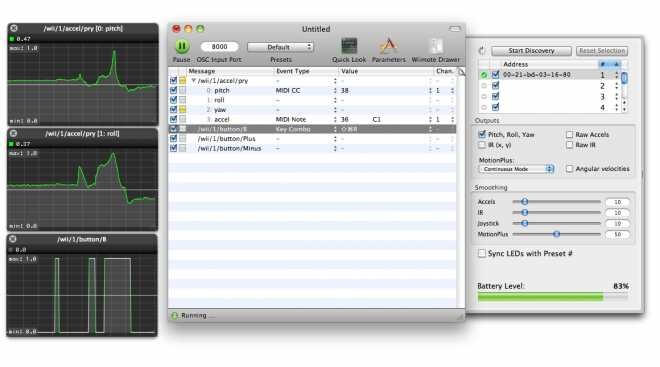
OSCulator is a powerful macOS application designed to connect and bridge different control protocols such as OSC (Open Sound Control), MIDI, game controllers, and external hardware devices. It is widely used by musicians, performers, developers, and interactive artists who need real-time control over music software, visual applications, and digital instruments. With OSCulator, you can easily map buttons, sliders, and sensors to MIDI messages or OSC commands, making it an essential tool for live performances, studio setups, and multimedia installations.
The software acts as a “translator” between devices that normally wouldn’t communicate with each other. For example, you can use a gaming controller to control Ableton Live, or convert sensor data from mobile apps into MIDI signals. OSCulator is known for its stability, low latency, and flexible scripting options, making it a favorite among professionals in the creative tech industry. Its clean interface and powerful automation system allow users to build complex interactive setups without deep programming knowledge.
Key Features of OSCulator
- MIDI & OSC Mapping:
- Easily convert OSC messages into MIDI signals and vice versa for seamless device communication.
- Game Controller Support:
- Use PlayStation, Xbox, and other controllers to control music or visual software.
- DAW Integration:
- Works smoothly with Ableton Live, Logic Pro, and other music production tools.
- Low Latency Performance:
- Designed for real-time control during live performances and studio use.
- Advanced Automation:
- Supports scripting and rule-based actions for complex workflows.
- Wireless Device Support:
- Connect mobile apps and remote devices over Wi-Fi using OSC.
How to Download OSCulator (Mac)
- Visit the official OSCulator website
- Click on the Download for macOS button
- Open the downloaded .dmg file
- Drag OSCulator into the Applications folder
- Launch and start configuring your MIDI/OSC setup