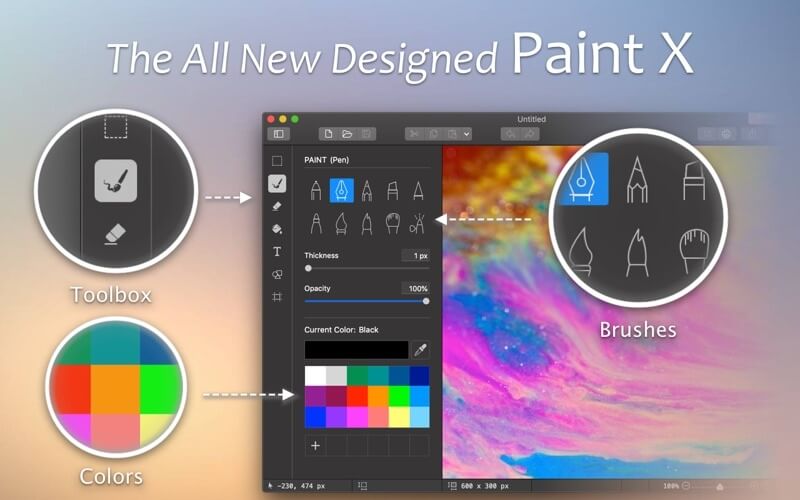
Paint X is a simple yet powerful drawing and image editing application designed for macOS users who want an easy-to-use alternative for creating digital artwork, editing images, and adding creative effects. With a clean interface and beginner-friendly tools, Paint X allows users to draw sketches, edit photos, add text, apply shapes, and perform basic image adjustments without needing advanced design skills. It is suitable for students, designers, and everyday Mac users who need a lightweight graphics editor.
Paint X for Mac provides essential painting and editing features while maintaining smooth performance on modern macOS systems. The application supports multiple drawing tools, layers, color options, and image formats, making it useful for quick edits, annotations, and creative projects. Whether you want to create illustrations, modify screenshots, or enhance images, Paint X offers a convenient solution with an intuitive workflow.
Key Features
- Easy-to-Use Drawing Tools:
- Create digital artwork using brushes, pencils, shapes, lines, and other drawing tools with a simple interface.
- Image Editing Options:
- Edit photos by cropping, resizing, rotating, adding text, and applying basic adjustments quickly.
- Support for Multiple Formats:
- Open and save images in commonly used formats for better compatibility with other applications.
- Layers Support:
- Work with multiple layers to organize drawings and make editing easier.
- Text and Shape Tools:
- Add custom text, arrows, symbols, and geometric shapes to images and designs.
- Color Customization:
- Choose from different colors, gradients, and brush settings to create unique artwork.
- Lightweight Performance:
- Designed to run smoothly on Mac computers without consuming excessive system resources.
How to Download Paint X for Mac?
- Click the download button available on the website.
- Save the Paint X installer file to your Mac.
- Open the downloaded file and follow the installation instructions.
- Launch Paint X from the Applications folder.
- Start creating drawings or editing images on your Mac.