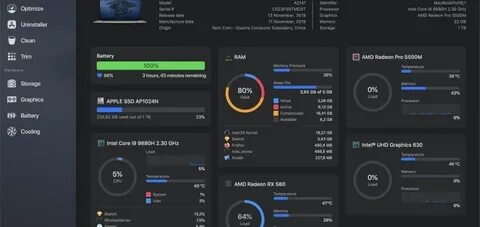
Sensei for Mac is a powerful all-in-one utility designed to help macOS users monitor system performance, optimize storage, and maintain their Mac with ease. Whether you want to free up disk space, keep an eye on your CPU and GPU temperatures, or improve overall system performance, Sensei provides an intuitive dashboard that makes Mac maintenance simple for beginners and professionals alike.
The software combines hardware monitoring, storage management, startup optimization, battery health analysis, and system cleanup into a single application. With its clean interface and real-time performance statistics, Sensei helps users identify performance issues before they become serious. It is an excellent choice for anyone looking to keep their Mac running smoothly and efficiently without relying on multiple maintenance tools.
Key Features
- Real-Time Hardware Monitoring :
- Monitor CPU, GPU, memory, SSD, fan speed, and temperature in real time.
- Storage Analyzer :
- Visualize disk usage and quickly locate large or unnecessary files consuming storage.
- System Cleanup :
- Remove caches, logs, temporary files, and other junk data to recover valuable disk space.
- Startup Manager :
- Manage login items and background applications to improve boot speed.
- Battery Health Monitoring :
- Check battery condition, charging cycles, temperature, and overall health.
- Performance Dashboard :
- View live system resource usage through an easy-to-understand interface.
- Fan Control :
- Customize fan behavior to balance cooling performance and system noise.
- SMART Drive Monitoring :
- Monitor SSD and HDD health to detect potential drive issues early.
- Modern macOS Interface :
- Fully optimized for the latest versions of macOS with a clean and responsive design.
How to Download
- Download the latest version of Sensei for Mac from a trusted source.
- Open the downloaded DMG file.
- Drag Sensei into the Applications folder.
- Launch the application from Applications.
- Grant the required macOS permissions when prompted.
- Start monitoring and optimizing your Mac.