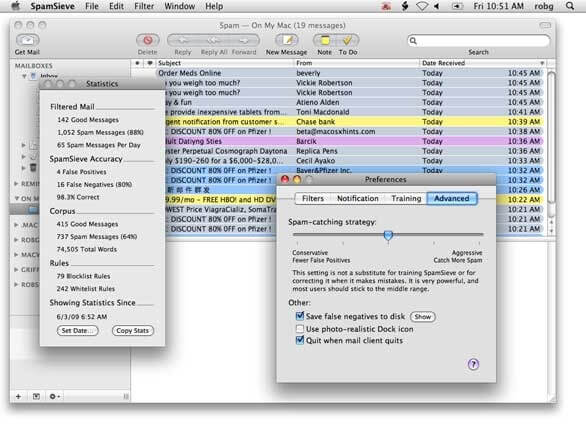
SpamSieve is a powerful spam filtering application designed exclusively for macOS users who want to keep their inbox clean and organized. Using advanced Bayesian filtering technology, SpamSieve intelligently learns from your email habits to accurately identify spam messages while ensuring that legitimate emails reach your inbox. It works seamlessly with popular email clients, including Apple Mail, Outlook, Airmail, MailMate, Postbox, and many others, making it an excellent choice for both personal and professional users.
Whether you receive hundreds of emails every day or simply want better protection against phishing attempts and junk mail, SpamSieve provides a reliable and efficient solution. The software continuously improves its filtering accuracy as you train it, offering industry-leading spam detection without compromising your privacy. Its lightweight performance, regular updates, and user-friendly interface make it one of the best spam filtering tools available for Mac.
Key Features
- Advanced Bayesian Spam Filtering:
- Uses intelligent machine learning to accurately detect spam and continuously improves with your feedback.
- Works with Multiple Email Clients:
- Fully compatible with Apple Mail, Microsoft Outlook, Airmail, MailMate, Postbox, Mailsmith, and many other macOS email applications.
- High Spam Detection Accuracy:
- Identifies unwanted emails with exceptional precision while minimizing false positives.
- Automatic Learning:
- Learns from your corrections to improve filtering performance over time.
- Phishing Protection:
- Helps reduce the risk of phishing attacks by identifying suspicious emails before they reach your inbox.
- Privacy Focused:
- Processes your email locally on your Mac without sending personal data to external servers.
- Fast and Lightweight:
- Optimized for macOS with minimal CPU and memory usage.
- Regular Updates:
- Frequent updates ensure compatibility with the latest macOS versions and email clients.
How to Download?
- Download the latest version of SpamSieve for macOS.
- Open the downloaded DMG file.
- Drag SpamSieve into the Applications folder.
- Launch the application and grant the required permissions.
- Connect it with your preferred email client.
- Train the spam filter using the setup wizard for the best filtering accuracy.
- Enjoy a cleaner, spam-free inbox.