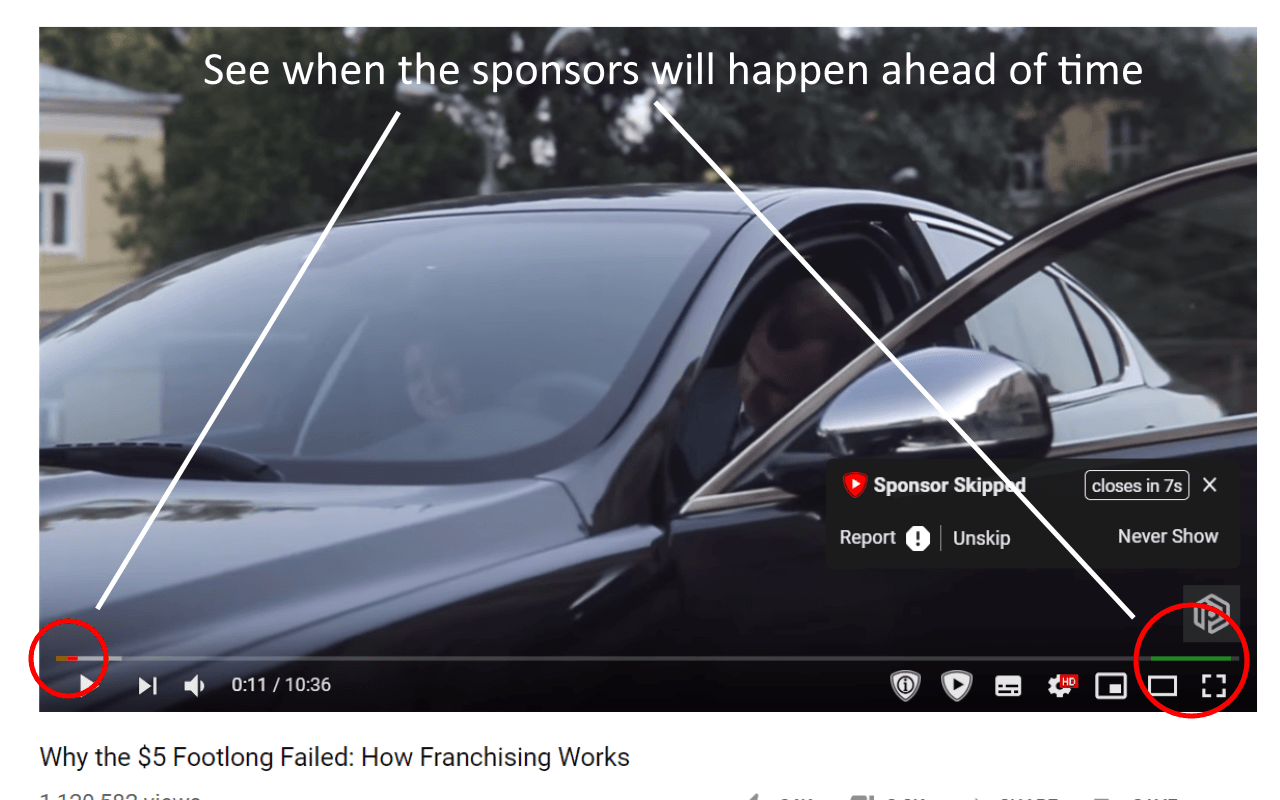
SponsorBlock for YouTube is a powerful browser extension designed to automatically skip sponsored segments, intros, outros, and other non-essential parts of YouTube videos. It is especially useful for users who want a clean, uninterrupted viewing experience without manually fast-forwarding through ads or promotions. The tool works in the background by using a community-driven database that marks timestamps in videos, allowing you to enjoy content faster and more efficiently.
This extension is lightweight, easy to install on Mac systems, and works smoothly with popular browsers like Chrome, Safari (via extensions support), and Firefox. It has become one of the most popular YouTube enhancement tools for productivity users, students, and daily video watchers who want to save time and focus only on meaningful content.
Key Features of SponsorBlock for YouTube
- Auto Skip Sponsored Segments:
- Automatically removes paid promotions inside videos
- Skip Intros & Outros:
- Jump directly to the main content
- Community Powered Database:
- Uses user-submitted timestamps for accuracy
- Custom Skip Settings:
- Choose what parts you want to skip (ads, music sections, fillers, etc.)
- Lightweight Extension:
- Runs smoothly without slowing your browser
- Open Source Tool:
- Transparent and regularly updated by developers
- YouTube Integration:
- Works directly inside YouTube player interface
How to Download & Install on Mac
- Open your browser (Chrome / Firefox recommended)
- Go to the official extension store (Chrome Web Store or Firefox Add-ons)
- Search: “SponsorBlock for YouTube”
- Click Add to Browser / Install
- Enable the extension after installation
- Open YouTube and start watching videos normally
How It Works
- SponsorBlock works by detecting marked segments inside YouTube videos. When a video starts, it checks its online database for timestamps like sponsored content, intros, or self-promotion. If a match is found, it automatically skips that section or shows a small prompt. Users can also contribute by marking segments, improving accuracy for everyone.