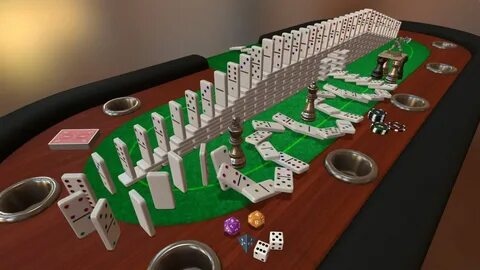
Tabletop Simulator for Mac is the ultimate digital sandbox for board game enthusiasts, offering players the freedom to create, customize, and enjoy thousands of tabletop games in one place. Whether you want to play classic chess, poker, Dungeons & Dragons, or community-created board games, Tabletop Simulator delivers a realistic physics-based experience that feels just like sitting around a real table with friends. Thanks to Steam Workshop support, users can access an enormous collection of free community-made content.
Designed for both casual players and dedicated tabletop fans, Tabletop Simulator features online multiplayer, customizable game rules, and endless modding possibilities. The game doesn't limit players to predefined experiences—instead, it provides all the tools needed to build unique games, import custom assets, and enjoy multiplayer sessions with friends across the world. Its flexibility and active community make it one of the best tabletop gaming platforms available for macOS.
Key Features
- Unlimited Tabletop Games:
- Play thousands of board games, card games, dice games, and RPGs.
- Realistic Physics Engine:
- Every object behaves naturally, creating an authentic tabletop experience.
- Online Multiplayer:
- Join or host games with friends and players worldwide.
- Steam Workshop Integration:
- Download thousands of free community-created games and mods.
- Create Your Own Games:
- Import custom boards, cards, miniatures, textures, and scripts.
- VR Support:
- Enjoy tabletop gaming in virtual reality (supported hardware required).
- Game Saving:
- Save your progress and continue your sessions whenever you want.
- Built-in Voice & Text Chat:
- Communicate easily with teammates during gameplay.
- Sandbox Mode:
- Freely experiment with objects, physics, and game mechanics.
- Regular Updates:
- Receive bug fixes, improvements, and new community content.
How to Play
- Download and install Tabletop Simulator on your Mac.
- Launch the game through Steam.
- Create a private or public multiplayer lobby, or play solo.
- Choose a built-in game or download one from the Steam Workshop.
- Invite friends to your session and customize the game settings.
- Interact with cards, dice, boards, and pieces using realistic physics controls.
- Save your game anytime and continue later.