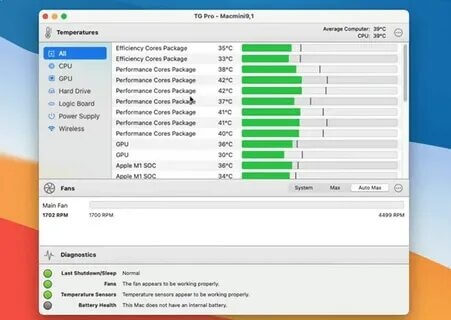
TG Pro is a powerful macOS utility designed to monitor your Mac’s internal temperature, control fan speeds, and keep track of hardware performance in real time. It provides detailed information about CPU, GPU, battery, SSD, and other internal components, helping users prevent overheating and maintain better system performance. With its simple interface and advanced monitoring tools, TG Pro is a useful application for Mac users who want more control over their device’s cooling system.
TG Pro allows users to manually adjust fan speeds or create automatic fan control rules based on temperature levels. The software also provides detailed hardware diagnostics, temperature alerts, sensor monitoring, and the ability to export system reports. Whether you are using a MacBook, iMac, Mac mini, or Mac Pro, TG Pro helps improve stability and optimize thermal performance during heavy workloads such as video editing, gaming, and professional applications.
Key Features
- Real-Time Temperature Monitoring:
- Displays live temperature readings from CPU, GPU, SSD, battery, and other Mac hardware sensors.
- Custom Fan Speed Control:
- Allows users to manually control fan speeds or create automatic profiles for better cooling management.
- Smart Fan Profiles:
- Automatically adjusts fan speed according to temperature changes to maintain a balance between performance and noise.
- Hardware Diagnostics:
- Provides detailed information about Mac components and helps identify possible overheating issues.
- Temperature Alerts:
- Sends notifications when hardware temperatures reach high levels.
- Menu Bar Monitoring:
- Shows important temperature and fan information directly from the macOS menu bar.
- Support for Multiple Mac Models:
- Works with MacBook, iMac, Mac mini, and Mac Pro devices.
- System Report Generation:
- Allows users to create detailed reports for troubleshooting and hardware analysis.
How to Download TG Pro for Mac?
- Download the TG Pro installer file compatible with your macOS version.
- Open the downloaded .dmg file and launch the installer.
- Drag TG Pro into the Applications folder.
- Open the application and allow necessary system permissions.
- Configure fan settings and start monitoring your Mac hardware.