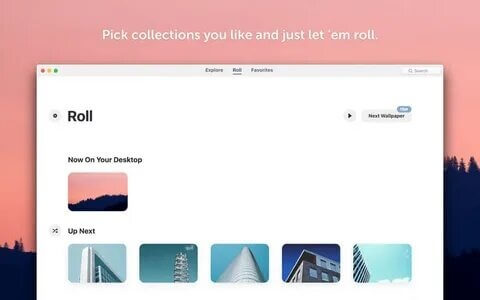
Wallpaper Wizard is a powerful macOS wallpaper management application that allows users to transform their desktop with thousands of high-quality wallpapers. The app provides access to a huge collection of beautiful images, including nature, landscapes, abstract designs, cities, and artistic backgrounds. With its simple and elegant interface, Wallpaper Wizard makes it easy to customize your Mac desktop and automatically change wallpapers according to your preferences.
Designed for Mac users who love personalization, Wallpaper Wizard offers advanced wallpaper browsing, automatic rotation, and high-resolution images optimized for different screen sizes. The application runs smoothly in the background and helps keep your desktop fresh with new wallpapers every day. Whether you want a professional workspace look or a creative desktop environment, Wallpaper Wizard provides an easy way to enhance your macOS experience.
Key Features:
- Thousands of HD Wallpapers:
- Access a large collection of high-quality wallpapers covering different categories such as nature, technology, animals, architecture, and abstract artwork.
- Automatic Wallpaper Changing:
- Set your preferred time interval and let Wallpaper Wizard automatically update your desktop background.
- High-Resolution Images:
- Enjoy wallpapers optimized for Retina displays and modern Mac screens with sharp details and excellent quality.
- Easy Wallpaper Management:
- Browse, download, save, and organize your favorite wallpapers quickly using the simple interface.
- Multiple Display Support:
- Customize wallpapers across multiple monitors connected to your Mac.
- Minimal Resource Usage:
- Runs efficiently in the background without slowing down your Mac performance.
- User-Friendly Interface:
- Provides a clean and easy-to-use design suitable for both beginners and advanced users.
How to Download Wallpaper Wizard for Mac?
- Click on the download button available on the website.
- Download the Wallpaper Wizard setup file for macOS.
- Open the downloaded file and follow the installation instructions.
- Move the application to the Applications folder.
- Launch Wallpaper Wizard and start customizing your Mac desktop.